
Hello everyone, in this series we’ll walk through a structured, step-by-step approach for testing and attacking a web application. This methodology is organized as a sequence of tasks, arranged based on their logical relationships. Information discovered at one stage can often be reused to refine earlier steps and improve your overall testing strategy.
For instance, discovering an access control vulnerability that exposes a list of users could make password-guessing attacks more effective. Similarly, a file disclosure issue might allow you to review source code directly, giving deeper insight than relying purely on black-box testing.
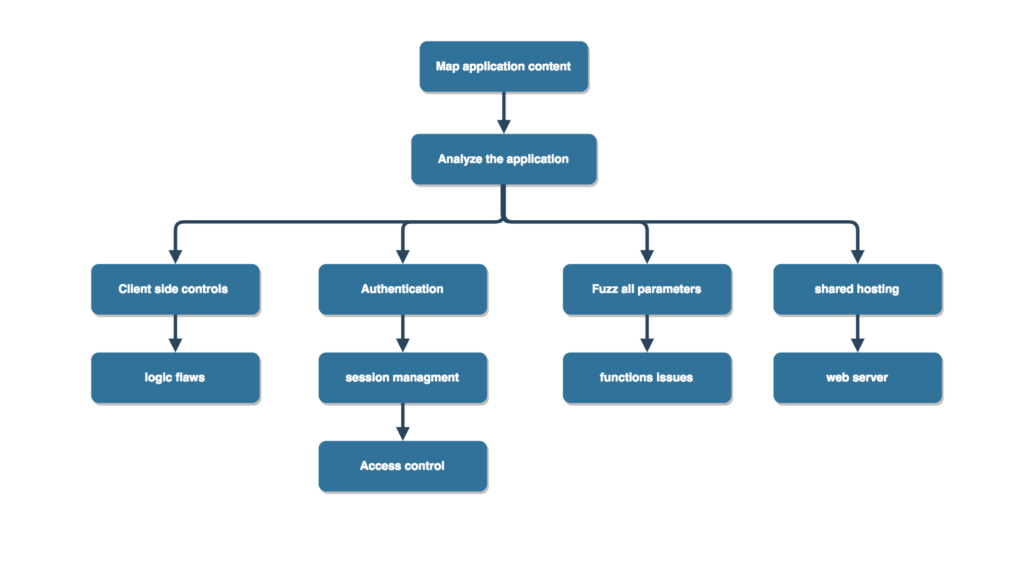
Mapping Application Content
1. Explore Visible Content
1.1. Configure your browser to route traffic through a proxy tool of your choice. A common option is Burp Suite, which can intercept and analyze web traffic.
1.2. Navigate through the entire application as a normal user would. Visit all links, submit all forms, and complete any multi-step workflows. If authentication is required, use valid credentials or create an account to access restricted areas.
1.3. While browsing, observe the requests and responses in your proxy tool. This helps you understand how data is transmitted and how client-side input influences server-side behavior.
1.4. Use passive crawling (e.g., Burp Suite’s spidering feature) to uncover content or endpoints you may have missed during manual exploration.
2. Use Search Engines for Reconnaissance
2.1. Leverage advanced search operators to improve results. For example, using site: in Google can reveal indexed pages from the target domain.
2.2. Search for names, email addresses, or other data discovered within the application, including information hidden in HTML comments.
2.3. Look for discussions, documentation, or technical references related to the target application on forums and other online sources.
3. Identify Hidden Content
3.1. Determine how the application responds to requests for non-existent resources. Compare valid vs. invalid responses to recognize patterns.
3.2. Analyze naming conventions used by developers. For example, if pages like AddDocument.jsp and ViewDocument.jsp exist, similar endpoints such as EditDocument.jsp or DeleteDocument.jsp might also be present.
3.3. Inspect all client-side code, including JavaScript and HTML comments, for clues about hidden functionality.
3.4. Use automated tools (such as directory brute-forcers) to discover additional endpoints. Tools like dirsearch or dirbuster are commonly used, with many preferring dirsearch for its efficiency.
4. Enumerate Function-Based Parameters
Look for application features where functionality is controlled via parameters (e.g., /admin.jsp?action=editUser or /main.php?func=A21).
Test how the application behaves when invalid function values are supplied, and identify patterns that distinguish valid from invalid requests.
5. Test for Debug Parameters
Target key application features (like login, search, file upload/download) where debug parameters may exist.
- Common parameter names:
debug,test,source,hidden - Common values:
true,yes,on,1
Try different combinations across requests. For POST requests, include parameters both in the URL and request body. Tools like Burp Intruder (Cluster Bomb mode) can automate testing multiple combinations efficiently.
Analyzing the Application
1. Identify Core Functionality
Understand how the application’s security mechanisms work, particularly:
- Authentication
- Session management
- Access control
Also review supporting features such as user registration and password recovery.
2. Locate Data Entry Points
Identify all inputs where user data enters the system, including:
- URL parameters
- Form submissions (POST data)
- Cookies
- HTTP headers
3. Identify Technologies in Use
3.1. Determine the server-side technologies, such as programming languages, frameworks, databases, and email systems.
3.2. Examine HTTP response headers (e.g., Server) and HTML source code for clues about underlying software.
3.3. Review URLs, file extensions, directories, cookies, and session tokens to infer technologies. Use search engines to research unfamiliar components.
4. Map the Attack Surface
4.1. For each feature, consider common vulnerabilities associated with it. For example:
- File uploads → path traversal or file execution
- Messaging features → cross-site scripting (XSS)
- Contact forms → SMTP injection
4.2. Develop a testing strategy by prioritizing high-risk functionality and likely vulnerabilities. Allocate your time and effort based on this prioritization.
In the next part, we’ll shift focus to client-side controls and how they impact application security.