In modern cloud environments, the question is no longer if an attacker can gain access, it’s what happens after they do!
Whether access comes from leaked credentials, phishing, SSRF, or a compromised machine, the real objective isn’t initial access, it’s how that access is expanded, abused, and turned into control over the environment and how to do it without being detected.
This post walks through a realistic red team approach to AWS; focusing on identity, privilege escalation, lateral movement, and stealth.
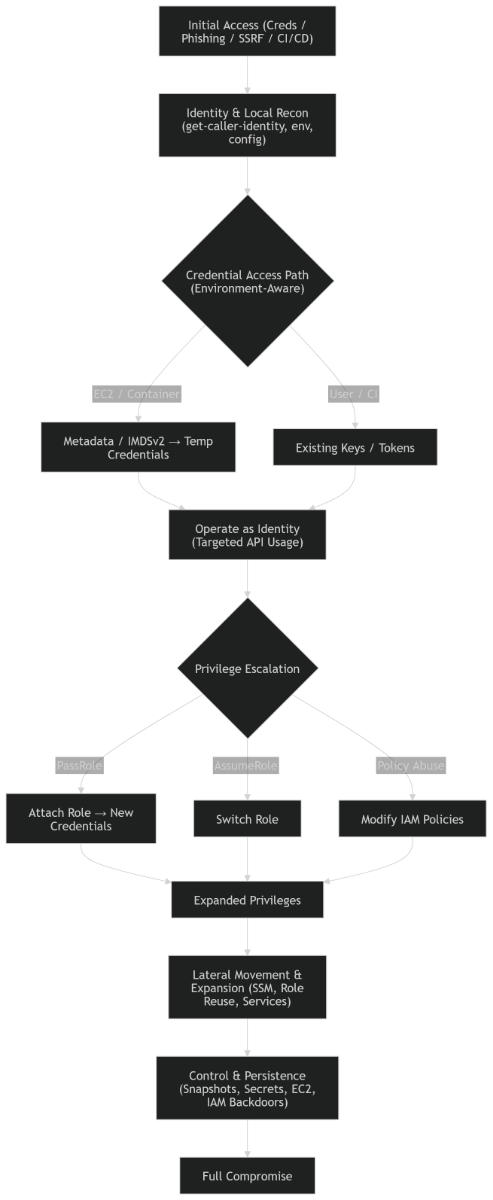
1. Initial Access Paths
Access can originate from multiple vectors:
- Exposed AWS credentials (GitHub, logs, misconfigurations)
- Phishing → AWS Console / SSO access
- SSRF or RCE in an application
- Compromised CI/CD pipelines or developer endpoints
Each provides a different entry point, but they all converge on one thing: You now have trusted access inside AWS.
2. Establish Your Identity
Before doing anything noisy, determine who you are:
aws sts get-caller-identityThis reveals:
- Account ID
- IAM user or role
- Privilege context
Note: Even this call is logged in AWS CloudTrail. Avoid repeating it unnecessarily.
A common mistake is jumping straight into AWS API enumeration. That’s noisy. Instead, extract as much context as possible locally first: Examples:
env
cat .env
cat config.yaml
Look for:
- AWS credentials
- Role names
- S3 buckets
- Internal endpoints
This gives valuable insight without generating API logs.
Even local activity can leave traces. Be mindful of shell history , temp files, cashed creds.
Examples of Basic tips:
unset HISTFILE
export HISTSIZE=0
Or operate in non-interactive shells where history is not recorded.
Also, avoid writing sensitive data to disk when possible. Use in-memory operations.
3. If You Landed in EC2 or a Container
Your priority is to extract identity from the environment.
3.1 Check Environment Variables
envYou may find:
- AWS_ACCESS_KEY_ID
- AWS_SECRET_ACCESS_KEY
- Session tokens
3.2 Access Instance Metadata
http://169.254.169.254/latest/meta-data/If IMDSv2 is enforced, you must first obtain a token.
IMDSv2 improves security by requiring a session token and preventing simple SSRF exploitation.
Example:
TOKEN=$(curl -X PUT "http://169.254.169.254/latest/api/token" \
-H "X-aws-ec2-metadata-token-ttl-seconds: 21600")
Then:
curl -H "X-aws-ec2-metadata-token: $TOKEN" \
http://169.254.169.254/latest/meta-data/iam/security-credentials/
Metadata access can be monitored. Avoid repeated requests and extract only what you need.
If Metadata is blocked, look for indirect paths:
- Internal services calling metadata
- Misconfigured proxies
- Application features allowing header injection
In hardened environments, metadata is rarely exposed directly, but often still reachable indirectly.
4. Think in Identities, Not Systems
Once you obtain credentials, shift your mindset:
You’re no longer attacking a server you are operating as an identity.
Minimize interaction early and avoid broad enumeration like:
aws s3 ls
aws ec2 describe-instances
aws iam list-roles
Every API call can be logged and analyzed by:
- AWS CloudTrail
- Amazon GuardDuty
Query only known resources and use targeted actions. For example, instead of listing all S3 buckets, try accessing a specific known bucket.
5. Privilege Escalation
Most AWS compromises happen here. Examples:
| Role | Abuse |
| sts:AssumeRole | Move into a more privileged role |
| iam:PassRole | Allows attaching roles to services like: EC2, Lambda, ECS |
| iam:AttachRolePolicy iam:PutRolePolicy | These can transform low-privileged identities into administrators. |
IAM actions are high signal events; avoid trial and error and try to identify the most likely escalation path before acting.
6. Lateral Movement
Once privileges expand, look for movement opportunities like reused IAM roles across instances or access to additional AWS services:
SSM access:
aws ssm start-session --targetSSM allows shell access without network exposure, making it both powerful and stealthy
7. Expanding Control
Now shift from access to control. Look for:
- EC2 instance creation
- Snapshot access (EBS / RDS)
- AWS Secrets Manager
Snapshots are often overlooked. they can contain full system images or database data.
8. Persistence
Examples of persistence mechanisms:
- Creating new IAM roles
- Modifying trust relationships
- Injecting into automation (Lambda, CI/CD pipelines)
Keep persistence subtle, obvious backdoors are quickly detected.
Key Principles
In AWS, everything is observable. Detection systems like Amazon GuardDuty look for:
- Unusual API usage
- New geographic access patterns
- Sudden spikes in activity
The difference isn’t whether you’re seen , it’s how suspicious you appear.
Cloud security is not about a single vulnerability, it’s about how access translates into control.
A leaked credential, phishing email, or SSRF bug are just starting points.
What determines impact is how identities are structured , how permissions are scoped, and how quietly an attacker operates. The loud attacker gets detected, the careful one maps the environment and owns it.
Once inside, the process is always the same:
- Understand who you are
- Learn what you can do
- Become something more privileged
- Expand carefully
- Stay invisible